
Your needs, this model
Does it fit your priorities?
Can Element Disc sit on a desktop base?
Yes. The US product cards list Arctic White ECEBW and Silver ECEBS with a Desktop Base. Separate Technology Base versions are ECEXS and ECEXW; both cards specify one USB port and one 120-V outlet.
Explore this need in the finder →Can I choose a clamp-mounted configuration, and is that the included clamp package?
The current US configuration interface offers Clamp (C), Clamp with Grommet Cover (G), and a 2-Piece Clamp with Theft Deterrent (T). A Silver Clamp (C) configuration route uses code ECECS. This is a configured mount choice, not proof that a separate clamp accessory is included with a Desktop Base code; confirm the final selected code and desk-edge fit. Humanscale publishes no jaw range in the reviewed sources.
Explore this need in the finder →Does the light have two linked supporting sections?
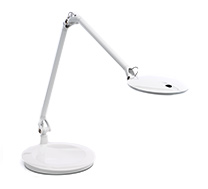
Yes. The exact product images show two linked support sections; the page lists 28 inches maximum reach and 18 inches working height. Those are separate measurements, not a guarantee of clearance over your particular screen.
Explore this need in the finder →Does its light meet the 90-cm-at-500-lux or Ra 95 finder thresholds?
No such width is stated. Humanscale publishes 330 lumens, 3000 K and CRI 80, but those values do not establish a 90-cm width at 500 lux or Ra 95. Its PIR occupancy sensor is not automatic paper/screen adjustment.
Explore this need in the finder →Element Disc is Humanscale's articulated desk lamp with a sensor and more than one way to support it. The manufacturer presents it as a configurable product rather than a single fixed package: current US cards identify two Desktop Base and two Technology Base codes, while the live configurator also offers several clamp forms. That distinction is more useful than treating every Disc as the same desk setup. This is a source-based assessment of the documented configurations, not a hands-on test.
Two linked sections, but still check the desk geometry
The official images show two linked supporting sections connected by an elbow, and Humanscale lists a maximum reach of 28 inches and a working height of 18 inches. Those figures help frame where the lamp may reach, but they are not a dimensioned map of every head position and do not say whether the arm clears a tall monitor, shelf, or wall. The internal counterbalance and one-touch positioning are aimed at repositioning rather than fixing a shade in a single spot. Disc also folds into a compact nesting position when it is not being used. None of that establishes the footprint of the base or a clamp's fit on a particular desk.
The support and outlet arrangement are real configuration choices
The current US product cards list Arctic White ECEBW and Silver ECEBS with a Desktop Base. The separate Technology Base cards are Silver ECEXS and Arctic White ECEXW; each is described as having one USB port and one 120-volt outlet. In the same US configurator, the selectable mount names include Desktop Base (B), Clamp (C), Clamp with Grommet Cover (G), a two-piece clamp with theft deterrent (T), Technology Base (X), and a Technology Base with two 120-volt outlets (Y). A Silver Clamp (C) configuration page uses code ECECS. The configurator also exposes a wall option and universal slatwall option, which are not desk-base or desk-clamp arrangements in the finder. The product page separately claims twenty mount options, while the current interface inspected here exposed eight named choices; I would not infer unlisted mount codes from that broader count.
For a desk with no free area for a heavy base, the configured C, G, or T clamp route is the relevant one. It is a different purchase configuration from a Desktop Base code, not an assurance that a separate clamp will be bundled if a seller offers the base SKU. Humanscale does not publish a jaw range in the material reviewed here, so confirm the final configuration code, clamp package, edge thickness and any clearance behind the desk before relying on it. The Technology Base trades a plain support for a more capable desk-side power hub; the two-outlet Y option differs from X, so check which exact outlet arrangement appears in the offer rather than assuming the two are interchangeable.
A sensor is not a paper-and-screen mode
Disc uses an occupancy sensor, not automatic adjustment to paper and screen surfaces. The product page describes a PIR sensor that switches the lamp off when the user leaves and on when the user returns. Its exact instructions add a concrete limit: the sensor turns the light off after about ten minutes without detected motion, and the user can deactivate that sensor by holding the power control for about five seconds. If your routine involves sitting relatively still, the automatic shutoff is a practical control to understand, not an ambient-light measurement. The seven brightness levels and last-setting memory give a separate manual adjustment path. The reviewed sources do not describe the paired automatic paper and screen modes in this finder's question.
Published light data is not a coverage guarantee
Humanscale lists 330 lumens, seven watts, 3000 K, and CRI 80 for Disc. Its specification guide calls the beam footprint ultra-wide, but the reviewed model sources do not state a width of at least 90 cm at 500 lux. A lumen total, warm-neutral color temperature, or broad marketing description cannot stand in for that thresholded width. Likewise, CRI 80 does not reach the finder's published Ra 95 cutoff for color-detail work. These figures describe what the manufacturer publishes; they are not measurements made for this assessment.
Service and buying checks
The model-specific guide says the head assembly is replaceable for in-field repair. That is a serviceability statement about an assembly, not a promise of a customer-replaceable bulb or a particular repair price. The page links to general warranty terms rather than giving a model-specific duration in the captured source set, so check the current written terms. Before buying, match the item code to the support and outlet configuration, verify the color and North American plug, and get the exact installation instructions for the selected mount. Disc is most compelling in the documentation when its adjustable arm, occupancy control, or outlet-equipped base solves a real placement problem. If none of those distinctions matters, its extra configuration choices may simply give you more details to verify than a simpler desk lamp.
Key specifications
Key details at a glance
| Lowest listed color rendering index (Ra) | 80 |
|---|---|
| Brightness levels | 7 |
| Linked arm sections | 2 |
| Maximum power | 7 W |
| Maximum listed luminous flux | 330 lm |
| Listed arm reach | 28 in |
Use the exact model’s instructions for operating limits, supplied equipment and version differences.
Sources for this review
Sources for this assessment
- Humanscale US Element Disc product page
- Humanscale US Element Disc configured product cards
- Humanscale US Element Disc configuration interface, default Desktop Base configuration
- Humanscale US Element Disc configuration interface, Silver Clamp configuration
- Humanscale Element Disc specification guides
- Humanscale Element Disc user/installation instructions
- Exact-code Humanscale Element Disc product images
Put your desk requirements together
A lamp’s specifications are only useful when they fit your workspace. Use the finder to compare documented mount and adjustment arrangements.