
Your needs, this model
Does it fit your priorities?
Is this a monitor-mounted ScreenBar?
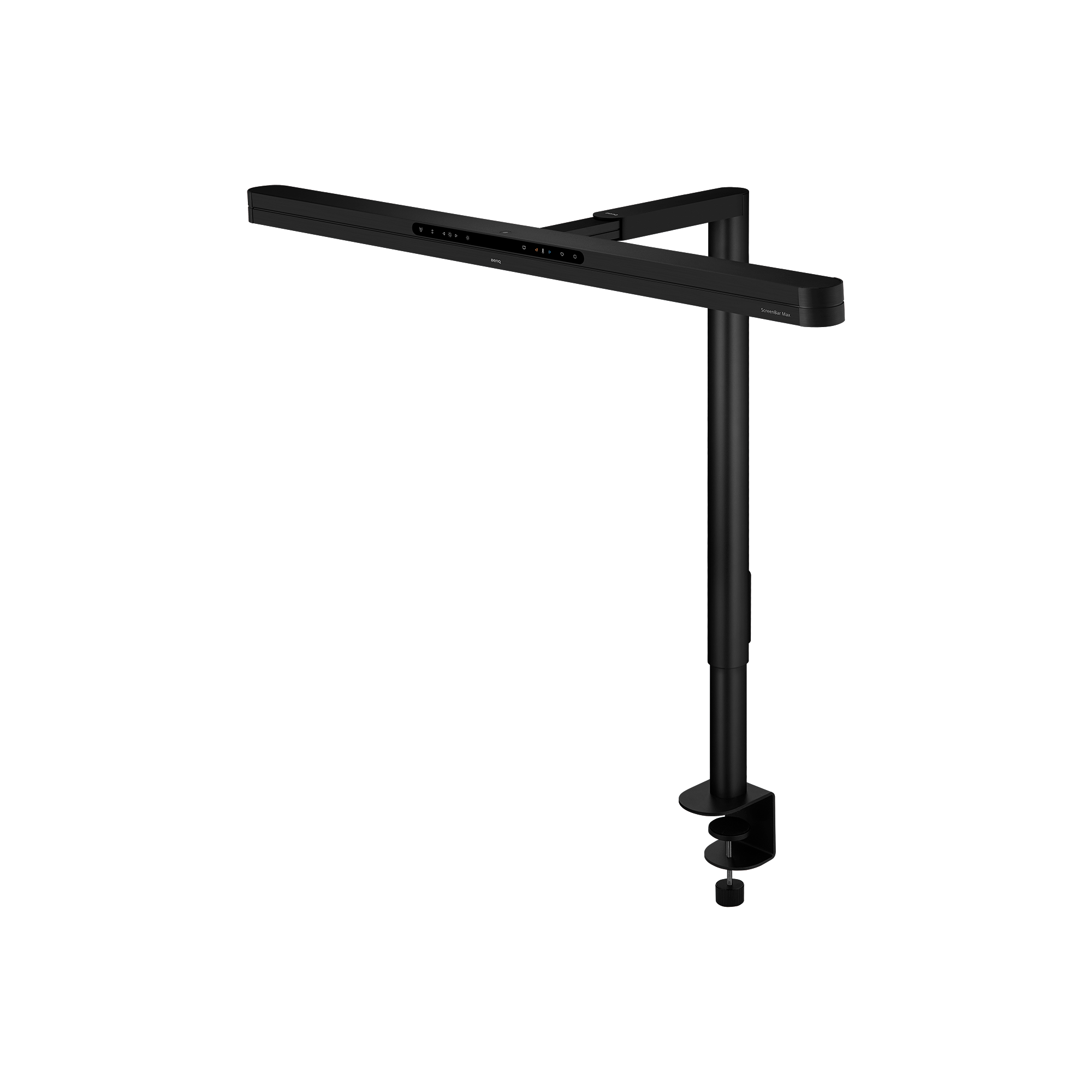
No. The official US catalog calls ScreenBar Max a dual-monitor desk lamp. Its package uses an included desk clamp, while BenQ's separate monitor-light-bar family mounts its bars directly to a monitor.
Explore this need in the finder →Does the exact package include its clamp?
The US package page lists an arm with desk clamp. BenQ specifies a maximum clampable desk thickness of 6 cm and says this clamp is for a desk rather than a riser or shelf; glass is not recommended.
Explore this need in the finder →Does its light-width claim exceed 35.4 inches at 500 lux?
BenQ's specification page lists 135 cm by 58 cm at 500 lux, while its newer FAQ lists the same 135 cm width with a different 75 cm depth under stated conditions. The common width clears the questionnaire's 90 cm threshold; neither figure is a measurement made here.
Explore this need in the finder →Is Ra 95 or higher published for the front light?
Yes. The exact specification page states Ra≥95 for the front light and separately lists Rf≥96; Ra and Rf are different measures and neither is independently tested here.
Explore this need in the finder →Does it document both automatic paper and screen modes?
No. BenQ describes a screen-reading mode and automatic dimming, but the reviewed exact sources do not document a paired paper-mode option. The lamp does not satisfy the questionnaire's both-modes requirement.
Explore this need in the finder →Current U.S. model · research-based assessment
ScreenBar Max is easy to mistake for another monitor light bar because of its family name and the long horizontal head. BenQ classifies it separately as a dual-monitor desk lamp. Its support stands on the desk: the current U.S. package listing includes an arm with desk clamp, and a compatible freestanding base is an optional separate purchase. The lamp is not attached to a monitor. That distinction matters if you want a light that can sit between screens or keep a narrow rear desk edge clear without relying on a monitor bezel.
What the coverage figures say—and do not say
BenQ's specifications page lists a 135 × 58 cm area at 500 lux, with 1,400 lux at the center when positioned at a 71 cm height. The same page gives a front-light Ra≥95 and Rf≥96; those are different color metrics and should not be collapsed into one claim. A separate BenQ FAQ, published in July 2026, lists the same 135 cm width but gives a 75 cm depth at up to 500 lux for a setup with the head unextended, at maximum brightness and 4,000 K. Because the depth figures differ, this review keeps the common 135 cm width but does not declare one source's depth as the single settled value. Both width figures are manufacturer claims, not measurements made for your desk.
This is materially wider than the 90 cm at 500 lux that BenQ lists for its e-Reading Desk Lamp and Genie, but width alone does not establish where that light falls around a particular keyboard, monitor stand or notebook. BenQ describes the Max's shaped light for wide dual-screen work and shows a rail and several fixed height choices. The product page recommends positioning the head about 5 cm in front of monitors, so the physical screen edge, stand and clamp placement should be checked together. Do not assume the pictured screens or desk arrangement are included.
Clamp included; base optional
The U.S. package page lists the lamp arm with desk clamp, lamp head, power adapter with cord, head-mounting screws, quick-start material and a hex key. That is a clearer package statement than a generic family description, but any seller offer should still be checked against the exact code, screen color and box contents. BenQ lists the clamp's maximum surface thickness as 6 cm and its compact footprint as 9 × 7 cm. Its overview says the clamp is intended for desks only: it should not be attached to monitor risers, shelves or other non-desk surfaces, and the company does not recommend the clamp on glass. A separately sold base offers a freestanding option with a listed 16.8 × 23.4 cm footprint.
These are alternative setups rather than one combined mount. A buyer who needs the base should account for the added accessory and base footprint; someone using the included clamp still needs a desk edge within the thickness limit, with suitable underside clearance and no obstruction from a cable tray or monitor arm. The lamp is a 2.65 kg unit with outer dimensions listed at 85 × 37.4 × 75.5 cm, so check the actual support surface and route the dedicated power adapter cord without stretching it.
Screen-oriented controls and dual light
The product page describes a front-facing touch interface with stepless brightness, stepless color temperature from 2,700 K to 6,000 K, automatic dimming and a screen-reading mode. BenQ's launch announcement says the screen-reading setting adjusts to room lighting and shifts to 4,000 K. The lamp also has a presence sensor for automatic on/off and an ambient backlight. These features address screen use, but the reviewed sources do not document the paired automatic paper and screen modes required by this site's questionnaire. The screen setting should not be broadened into a paper mode just because the lamp can be manually adjusted.
BenQ says not to power the unit from a USB-C port; it uses a dedicated connector and supplied adapter. That is a meaningful installation difference from a low-power USB lamp, so check that an outlet is available where the tall support and cord will sit. Ra≥95 is listed for the front light; Rf≥96 is a distinct fidelity figure. Neither number is an independent sample test or a guarantee that the desk surface, screen and room will look identical under all conditions.
Difference from monitor-mounted ScreenBars
The ScreenBar family page identifies monitor-mounted bars such as ScreenBar, Halo, Halo 2, Pro and iScreenBar. Max is in a separate dual-monitor desk-lamp category and the official buying page lists a desk clamp rather than a monitor clip. Its clamp arrangement frees the monitor top from a lightbar mount but occupies space at the desk edge; it will not satisfy someone who specifically needs a light attached to a monitor. Conversely, it is not restricted to the monitor-thickness and curvature limits listed for those lightbars. The product name alone does not tell you which mount to choose.
Compared with BenQ's e-Reading desk lamp, Max has the wider stated width, front and ambient rear light, screen-oriented automatic controls and a clamp included with the exact package. E-Reading uses a supplied tabletop chassis and offers an optional separate compatible clamp, with a different two-section arm. Max's sources do not establish two linked support-arm sections, so its height positions and sliding rail are not scored as that type of articulation. Neither lamp's listed outer dimensions are a complete reach envelope.
Practical limits of this assessment
The review is based on the current BenQ U.S. overview, specifications, purchase/package page, support FAQ and product announcement. No lamp was physically used, photometrically measured or tested here. The available manual-index page did not provide additional assembly text in the captured source; the main product page supplies the desk-only, thickness and glass guidance. The documented dimensions, lux/coverage values and control functions remain manufacturer statements. Verify the latest source, package, adapter, monitor clearance, desk material and optional-base requirement for the exact offer, and treat seller availability and return terms as separate facts.
For a wide two-monitor worktop where a desk clamp is acceptable and the included mount is useful, the Max has a distinct documented fit. If the edge is glass, a riser, a shelf or thicker than the published maximum, the clamp plan is unsuitable or unsupported; the separate base is the relevant alternative to investigate. If you need both automatic paper and screen modes, do not assume ScreenBar Max qualifies. The central comparison is therefore not simply a broad beam against a narrow one, but a desk-supported dual-screen package with particular installation limits and a screen-first control set.
Key specifications
Key details at a glance
| Manufacturer-stated width at 500 lux | 135 cm |
|---|---|
| Center illuminance at 45 cm | 1400 lx |
| Lowest listed color rendering index (Ra) | 95 |
| Lowest color temperature | 2700 K |
| Highest color temperature | 6000 K |
| Maximum power | 36 W |
| Maximum listed width | 85 cm |
| Maximum listed depth | 37.4 cm |
| Maximum listed height | 75.5 cm |
| Net weight | 2.65 kg |
| Documented tabletop arrangements | Included desk clamp / Optional separately sold desk base |
Use the exact model’s instructions for operating limits, supplied equipment and version differences.
Sources for this review
Sources for this assessment
- BenQ US ScreenBar Max dual-monitor desk-lamp overview
- BenQ US ScreenBar Max specifications
- BenQ US ScreenBar Max purchase page and package contents
- BenQ US ScreenBar Max light coverage FAQ
- BenQ US ScreenBar Max product announcement
- BenQ US dual-monitor desk-lamp product family
- BenQ US monitor light-bar family, distinct from ScreenBar Max
- BenQ US lighting store catalogue
- BenQ US ScreenBar Max user-guide index
Put your desk requirements together
A lamp’s specifications are only useful when they fit your workspace. Use the finder to compare documented mount and adjustment arrangements.